Showing posts with label UI. Show all posts

Tuesday, December 12, 2006

Closing Time

Y'know, that Run in Background button is remarkably disingenuous. I'm closing a project, which is taking forever, and I want to keep working in another project. Foolishly, I figure that, since this project is completely separate and unrelated, the background task won't interfere with anything else. Well …


Yes, merely creating a package appears to be such an earth-shattering system-wide task that it can't wait for that other project. Of course, the best part is that the project-closing operation appears to be stuck indefinitely. Given what I've learned about trying to stop things, I gave up and went straight for the kill command.

If a task is considered system-wide enough to hold up everything else, don't allow it to be backgrounded. It'll have to finish anyway before the user can actually do anything else (including quit ...), and pretending otherwise only builds up the irritation some more. (Also, hubbout we make closing a project not hang?)

Thursday, November 16, 2006

Details, Details

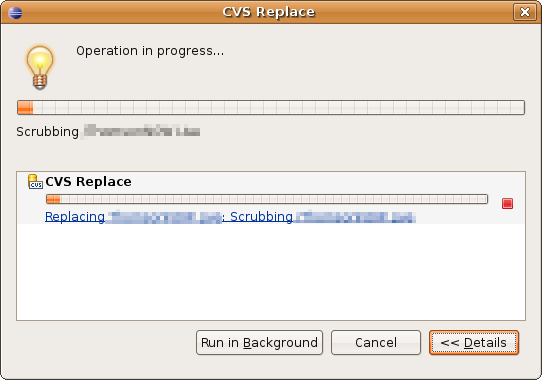
When Eclipse launches into a lengthy operation (being all too often), it shows the all-too-familiar progress window, with an “operation in progress” message, a progress bar, and a line of detail text below the bar. Theoretically, the detail text is simply of the form “[Overall Task]: [Item]” where [Overall Task] could be “copy” and [Item] could be a particular file.

Unfortunately, the detail text is often mighty skimpy with the details. Many operations just have the overall task part, and let you sit there wondering what it's doing for several minutes. (It doesn't help when the progress bar doesn't move.)

So it's a good thing there's a button saying “Details >>” on the lower right, with that lovely chevron inviting the user to expand the dialog and reveal … well, details of some kind about the operation. Hopefully a filename, maybe an individual progress bar for the subtask if we're lucky.

But no such luck — the details area merely lists all operations in progress, with the same damn progress bar and detail line. So if there's only one operation going on, all you get is exactly what you already had. “Details >>” indeed.

It's not that showing the progress of background operations along with the current one is a bad idea; it's quite useful. But the button's name implies two things that are false:

  • The expanded dialog will include deeper information about what's already in the dialog.
  • The dialog's scope will remain this operation. The dialog's subject is one operation, and unless a control says otherwise, no other operations should be involved.

The fix here, of course, is to change the name of the button. It should be called “Show All >>” or something similar. Simply put, what's being offered is more breadth of information, not depth. Now if they'll just explain exactly what “scrubbing” is …

Related bug reports


  • See bug #75968 for more dumb Details button behavior.

Wednesday, November 1, 2006

“Cancel” Means “Cancel”

Okay, here's a nice, cute little behavior to start off ... so I forgot to turn off Build Automatically before I imported a sizeable project, and so it's stuck building (which, since I haven't set things up right yet, is doomed to failure anyway.) So I turn off Build Automatically. Silly me, I'm hoping (despite past experience) that this will make it stop building. So I click on the little progress bar button to have a look at the background tasks, and sure enough there's a “Building Workspace” and a “Refreshing Workspace.” I cancel both of them. Nothing happens, except that they both now have “(Cancelled)” in their names. Finally, I hope things will sort themselves out if I quit and start Eclipse again. So I do, but after the Eclipse window disappears, I'm confronted with this:


Nice, huh? It's waiting on a few cancelled operations to stop ... cancelling. Dammit, I wasn't kidding when I said “cancel.” And definitely not when I said “quit.”

So then it sits around like that for a while, the “building” progress bar empty and the “refreshing” one bouncing back and forth. A few minutes (?!) later, it finally disappears. So I try to start up Eclipse again, and ... it says the workspace is still in use. Yep, Java's still running. Had to kill it from the command line. (And, for reasons unclear, network usage was pegged at 100% until I killed it.)

So here it is: “Cancel” means “cancel.” I don't care what you're doing, but it'd better not take more than a few seconds not to be doing it anymore. If it really can't be cancelled, there should be no friggin' Cancel button to begin with. Have some respect for my time, for crying out loud.


Related bug reports