Showing posts with label Synchronization. Show all posts

Tuesday, November 21, 2006

I'd Prefer It Not Crash To Begin With, But ...

Eclipse doesn't save preferences until it quits — gracefully. Now, if it should ever happen that Eclipse (heaven forbid!) crashes or has to be killed, recent preference changes are lost. Keep in mind that setting up syntax highlighting the way you want it can easily take a half-hour given Eclipse's perverse preferences dialog (but that's a story for another day …).

This isn't the only way Eclipse goes out of sync when it crashes. Lord knows Eclipse is damn lazy about refreshing filesystem data (though if auto refresh is on, it's raving-lunatic zealous about it instead). But for God's sake, people can spend a long time tweaking preferences, even when the dialog isn't an affront to all that is holy. Sync preference changes to disk immediately if not PDQ. If the program has to sit for a few seconds when you hit OK so it can save the preferences, oh well. This is Eclipse. Why care about being sluggish only now?

Workaround

Once you've made your way through the labyrinth that is the preferences dialog (don't be fooled by the search field … if only the dialog were merely poorly organized … but again, another day), go to File → Switch Workspace … and switch to the workspace you're already using. It'll exit and relaunch immediately. Yes, that can take a good half-minute, but at least it's not a half-hour.


Related bug reports


  • Bug #149629 is this issue, except I disagree with the solution (the preferences should simply be saved when they're changed).

Wednesday, November 15, 2006

Out of Sync

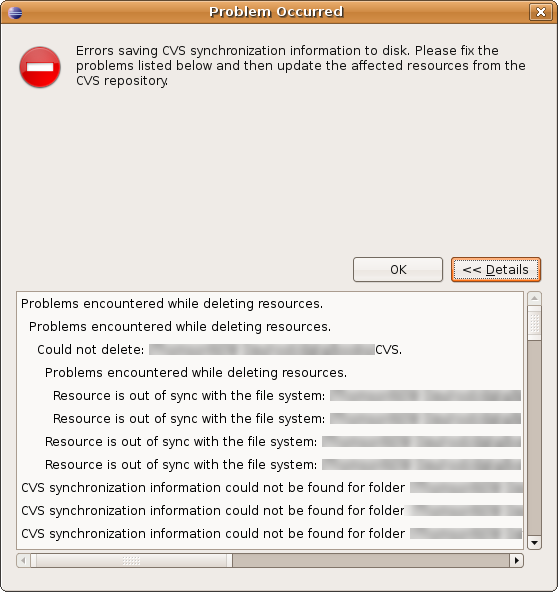
Here's an irritating little time-waster: CVS sync on large projects takes a LONG time. So ain't it just dandy when, five or ten minutes through (I exaggerate not), I get this gem:


So:

  1. Something is out of sync. (Actually most likely it's just a spurious timestamp change.)
  2. Eclipse knows that it's out of sync.
  3. Eclipse launched into a lengthy operation assuming that everything it thinks about all the tens of thousands of files in the project will hold.
  4. It believed itself utterly helpless on finding that a file was out of sync.
For God's sake ... Get it back into sync! It shouldn't be complaining unless metadata has changed that could affect the processing of other files. Not so in this case — these were all just dumb resources. And if being in sync is that important and cached information is that frequently stale (this error appears fairly often to me), do the user a damn favor and check it all first. Yes, it'll take a while — but not as long as half a CVS sync, followed by the refresh, followed by the whole sync over again.

(Yes, this problem occurs less often if I turn automatic refresh on. Bonus: Automatic refresh causes Eclipse to hold everything up for minutes at a time at unpredictable moments. Yay!)

Related bug reports


  • Bug #104224 is the same problem (RESOLVED INVALID, natch, since this is known behavior. Stupid known behavior, but known behavior.

  • Bug #135712 is a similar problem, though it was never followed through (maybe it went away?).